How Shopify Works: Storefront, Payments, and Order Flow

Shopify markets itself as the easiest way to start selling online. But the merchants who have actually built on it know the real picture is more layered. Once you're inside the platform, you're making decisions about themes, payment gateways, transaction fees, app stacks, and checkout configurations, and each of those decisions affects performance, cost, and conversion rate in ways the onboarding flow doesn't spell out.
Understanding how Shopify works end-to-end is not just a technical exercise. It's how you evaluate whether the platform matches your actual business model, your traffic volume, and your growth stage. This article walks through the full Shopify system, from storefront to payments to order flow, so you can make that call with clarity.
What Shopify Actually Is (and What It Handles for You)
Shopify as a Hosted Ecommerce Platform
Shopify is a cloud-hosted ecommerce platform that manages your store's infrastructure, checkout system, and payment processing in one integrated environment. Merchants sign in to the Shopify admin, build their storefront, list products, and sell without managing a web server or configuring SSL certificates. That is what Shopify does at its core: it removes the infrastructure layer so you can focus on selling.
This is the clearest answer to how Shopify works. The platform sits between your product catalog and your customer, handling the technical stack so you don't have to.
What Shopify Does vs. What You Configure
Shopify handles hosting, security, checkout PCI compliance, payment routing, and order data storage. You configure the storefront design, product catalog, pricing, shipping rules, tax settings, and any third-party integrations.
The distinction matters. When something breaks at the infrastructure level, Shopify owns the fix. When your conversion rate drops because the theme is slow or the product page copy is weak, that is your responsibility. Knowing where Shopify's ownership ends is essential for anyone building a serious Shopify ecommerce business.
How Shopify Compares to Self-Hosted Options Like WooCommerce
WooCommerce is a plugin for WordPress that turns a self-hosted site into an ecommerce store. Unlike Shopify, which is fully managed, WooCommerce requires you to source your own hosting, handle your own security patches, and manage plugin compatibility.
The trade-off is control versus convenience. WooCommerce gives you deeper access to the codebase. Shopify gives you a faster launch and predictable infrastructure. For teams without dedicated DevOps support, the best ecommerce platform is often the one that removes server management entirely. Shopify does that cleanly.
How Shopify Works: The Storefront Layer
Themes, Liquid, and the Online Store Channel
The Shopify storefront runs through a templating language called Liquid. Every page, product listing, and collection view is rendered through a Liquid theme. Merchants can buy themes from the Shopify Theme Store or work with a developer to build custom ones. The Online Store channel is the primary sales channel that connects your theme to your product catalog.
How to make a Shopify store starts here. The theme controls not just design but also page structure, load behavior, and how product data gets rendered. A bloated or poorly coded theme creates technical debt that compounds as you add pages and products.
How Shopify Handles Web Hosting and CDN Delivery
Shopify hosting runs on a global CDN, meaning your store's assets are served from servers close to your customer's location. This speeds up asset delivery for image-heavy product pages. Shopify manages server uptime, scaling during traffic spikes, and SSL certification automatically.
The trade-off is that you cannot access the server directly. You cannot modify server-side caching rules, configure custom headers at the infrastructure level, or choose your hosting region. For most Shopify store operators, this is acceptable. For high-scale stores with very specific performance requirements, it is a real constraint.
Where Storefront Performance Bottlenecks Come From
Shopify's managed hosting removes server maintenance burden, but it does not prevent front-end performance problems. Theme choice and app bloat are the two biggest controllable variables affecting Core Web Vitals scores.
Every app you install that injects JavaScript into the storefront adds load time. A store with 15 apps running front-end scripts will underperform a store with the same theme and five apps, every time. If your Shopify dashboard shows high traffic but low conversion, the storefront layer is the first place to investigate.
How Shopify Payments and Checkout Actually Work
The Shopify Checkout Flow Step by Step
Shopify checkout is a hosted flow. A customer adds items to cart, clicks checkout, enters contact information, selects a shipping method, enters payment details, and receives an order confirmation. By default, all of that happens on a single page (one-page checkout), and you can switch to a three-page layout from the admin. Each step is handled by Shopify's checkout infrastructure, not your theme.
This matters for conversion rate. Shopify checkout is fast and PCI-compliant by default, which removes friction for buyers. Every plan gets the checkout editor and branding controls such as logo, colors, and fonts. Deeper customization is where Shopify Plus comes in: apps that customize the information, shipping, and payment steps, and access to the Checkout Branding API, are Plus-only.
Shopify Payments vs. Third-Party Ecommerce Payment Gateways
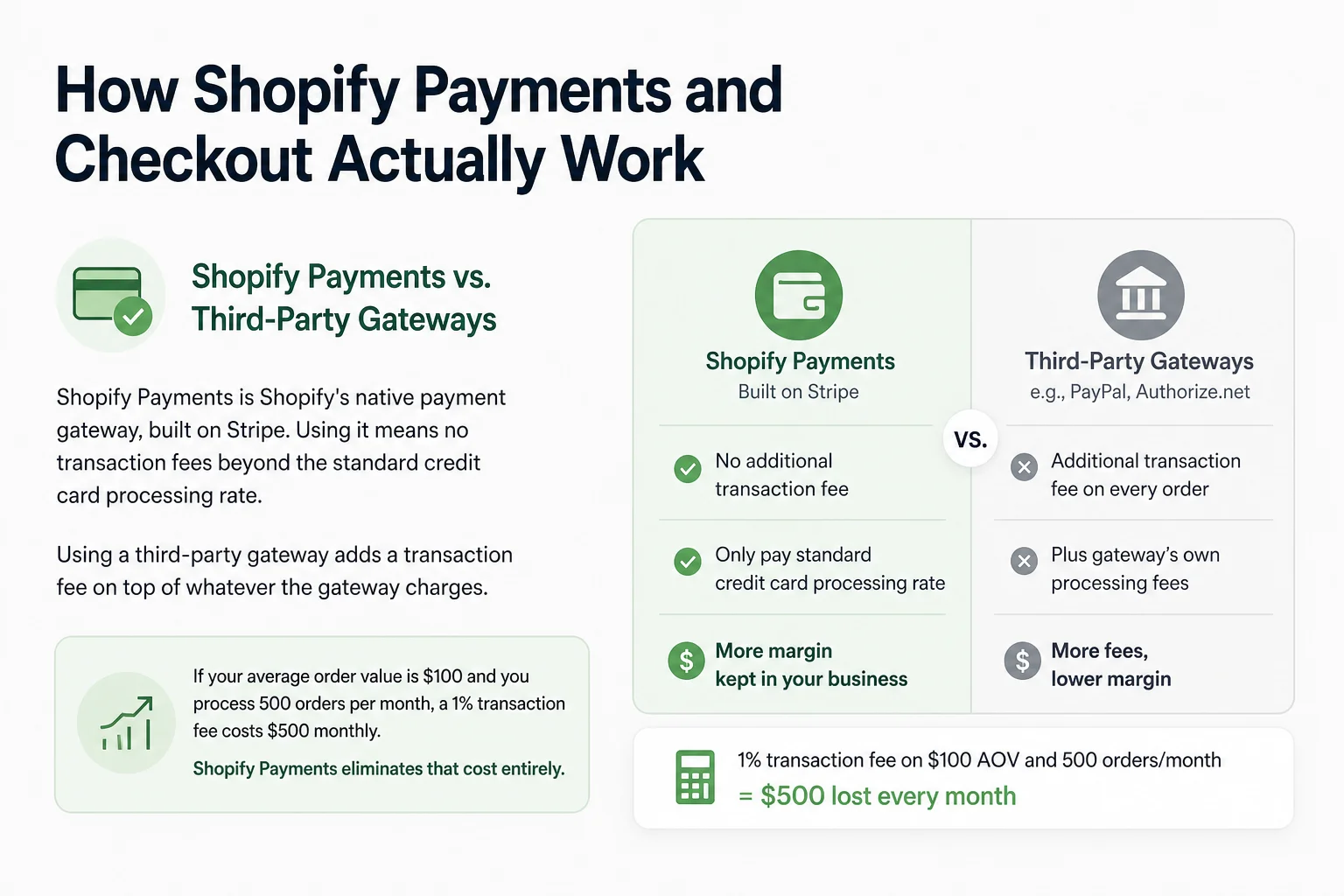
Shopify Payments is Shopify's native ecommerce payment gateway, built on Stripe. Using it means no third-party transaction fee, only the standard credit card processing rate. Using a third-party gateway, such as Authorize.net, adds a transaction fee on top of whatever the gateway charges. Orders paid through Shop Pay and PayPal Express are not charged that fee.
That fee structure has a direct impact on margin at volume. If your average order value is $100 and you process 500 orders per month, a 1% transaction fee costs $500 monthly. Shopify Payments eliminates that cost entirely, which is why most merchants default to it unless their region or product category requires otherwise.
Transaction Fees, Plans, and What They Actually Cost You
Here is how the main Shopify plan tiers break down (US, monthly billing):
| Plan | Monthly cost | Transaction fee (third-party gateway) | Card rate (online, Shopify Payments) |
|---|---|---|---|
| Basic | $39 | 2% | 2.9% + 30¢ |
| Grow | $105 | 1% | 2.7% + 30¢ |
| Advanced | $399 | 0.6% | 2.5% + 30¢ |
How much Shopify really costs depends on your transaction volume. At low volume, Basic is sufficient. At scale, the Advanced plan's lower transaction and card rates recover the higher monthly cost quickly. Annual billing lowers the monthly price on every plan. WooCommerce pricing follows a different model because the software is free, but hosting, security plugins, and payment gateway fees create a total cost of ownership that is not always lower.
How Shopify Handles Orders, Inventory, and Fulfillment
Order Management and the Fulfillment Workflow
Picture a merchant receiving 50 orders in a single day. Shopify automatically captures each order, deducts inventory, sends the customer a confirmation email, and creates a fulfillment task in the admin. What it does not do automatically is print the shipping label, notify your warehouse, or update a third-party logistics system.
How to sell on Shopify at volume means understanding that the platform handles data capture and customer communication. Physical fulfillment still requires either a manual workflow, a third-party logistics provider, or an app integration. For merchants fulfilling in-house, Shopify Shipping handles label generation and carrier rate calculation. For those using 3PLs, an integration app bridges the order data.
Inventory Tracking Across Channels
Shopify tracks inventory across multiple sales channels, including the online store, point of sale, and any connected marketplaces. When a product sells through any channel, inventory adjusts automatically. This prevents overselling in most scenarios, and multiple inventory locations are supported on every plan (up to 10 on Basic, Grow, and Advanced).
The system works cleanly at moderate complexity. Where it starts to strain is when a merchant has hundreds of SKUs with variants, sells across four or more channels, and needs real-time stock visibility for a warehouse team. That level of complexity requires dedicated inventory management software connected via API.
Connecting Shopify to Accounting and Operations Tools
The Shopify to QuickBooks integration is one of the most common back-office connections merchants set up. It syncs order data, refunds, and payouts to QuickBooks, reducing the manual reconciliation work that otherwise falls on operations or finance teams.
At scale, fulfillment workflows reveal gaps in storefront architecture. An order flow that works at 20 orders per day often breaks at 200. If you are reaching that inflection point, Karishma Garg's ecommerce development and consulting services help merchants identify where the storefront and back-office integration are creating operational drag, then build the architecture that supports growth rather than limiting it.
How to Start a Shopify Store: The Setup Sequence That Matters
Account Setup, Plans, and the Shopify Login Dashboard
How to start a Shopify store begins at the Shopify login screen. You create an account, choose a plan, and land in the admin dashboard. The dashboard surfaces your orders, products, analytics, and settings in a single interface. It is well-organized for new merchants, though the volume of configuration options can feel large on first login.
Choose your plan based on your expected monthly revenue, not your current revenue. If you anticipate scaling within six months, start on the Grow plan to avoid a mid-growth migration that disrupts reporting and app configurations.
How to Add Products to Shopify Correctly
How to add products to Shopify is straightforward at the surface. You navigate to Products, click Add Product, fill in the title, description, images, price, and inventory settings, then publish. Where merchants consistently make mistakes is in the SEO fields.
Each product has a meta title and meta description field that Shopify pre-populates from the product title. Leaving these auto-populated means Shopify ecommerce website pages compete poorly in search. Writing specific, keyword-relevant meta fields for each product takes time but directly affects organic discoverability.
Connecting a Domain, Activating Payments, and Going Live
Connecting a custom domain takes under ten minutes in the Shopify admin. Activating Shopify Payments requires identity verification and bank account connection. Both steps must be complete before your store accepts orders.
Common setup mistakes to avoid before launch:
- Choosing a theme before mapping the customer journey. A visually attractive theme built for fashion brands creates friction on a store selling industrial components. Match theme structure to how your customer actually shops.
- Skipping product SEO fields. Auto-populated meta titles lose search traffic that properly written fields would capture from day one.
- Enabling too many apps before launch. Each app added pre-launch that injects front-end scripts increases page load time. Audit app necessity before go-live, not after. This is one of the fastest ways to build technical debt and poor conversion rates simultaneously.
The best Shopify apps for a new store are those that solve a specific, confirmed problem. Install apps reactively, not speculatively.
How Shopify Works for Dropshipping and Non-Traditional Business Models
How Dropshipping on Shopify Works
How to dropship on Shopify follows a clear model. You list products from a supplier without holding inventory. When a customer orders, the order routes to the supplier, who ships directly to the customer. Apps like DSers or Zendrop connect supplier catalogs to your Shopify store and automate order forwarding.
The Shopify checkout and payment flow work identically for dropshipping. The only difference is in the fulfillment workflow, where the app handles supplier notification rather than an internal warehouse.
How to Make Money on Shopify Beyond Physical Products
How to make money on Shopify is not limited to physical product sales. Merchants sell digital downloads, online courses, subscriptions, and services through the platform. The Shopify App Store has tools for each model: digital product delivery, membership gating, and recurring billing.
Shopify's Spring 2026 Editions introduced Shopify Catalog and the Universal Commerce Protocol (UCP), which allow products to be discovered and purchased through AI-powered shopping channels. For growth leaders evaluating platform trajectory, this signals that Shopify is actively expanding how its merchant catalog connects to emerging discovery surfaces, not just traditional search and social.
The Shopify Partner Program for Developers and Agencies
The Shopify Partner program gives developers and agencies access to unlimited development stores, revenue share on referred merchant plans, and early access to platform features. A Shopify Partner can build and test stores for clients in a sandboxed environment without incurring plan costs during development.
For technical founders considering whether to build on Shopify or hire externally, the Partner ecosystem is a relevant signal. It means a large pool of developers and agencies already understand the platform's architecture deeply.
How Shopify Compares to Alternatives When Choosing a Platform
Shopify vs. Wix: Ecommerce Depth vs. Design Flexibility
Shopify vs. Wix is a decision between ecommerce infrastructure depth and design flexibility. Wix offers a drag-and-drop editor with fewer constraints on layout. Shopify offers a purpose-built ecommerce checkout, more robust inventory management, and a larger app ecosystem for scaling.
For a store processing more than a few hundred orders per month, Wix's ecommerce tools begin to show limitations in reporting, fulfillment integration, and checkout customization. Shopify's checkout is faster, more reliable, and better optimized for conversion at volume.
Shopify vs. WooCommerce: Managed Simplicity vs. Full Control
The Shopify vs. WooCommerce decision hinges on technical resources. WooCommerce gives you full access to the codebase, which means you can optimize every performance variable and customize checkout without a Plus plan. But you own every server decision, plugin conflict, and security update.
WooCommerce pricing starts low because the core plugin is free. Total cost rises quickly when you factor in managed WordPress hosting, a premium theme, and the paid plugins needed to replicate what Shopify includes by default. For teams without a developer on staff, that gap in maintenance burden often outweighs the cost savings.
When Shopify Is the Right Call for Small Business
Shopify is the best ecommerce platform for small business when fast deployment, reliable checkout, and minimal infrastructure management are the priorities. If your team needs to launch in weeks rather than months, start selling immediately, and grow into more complex configurations over time, Shopify's architecture supports that path.
The constraint is customization ceiling. If your checkout experience, storefront layout, or back-office integration needs fall outside what Shopify's plans and approved app stack can handle, you will either need Shopify Plus or a different platform entirely.
FAQ
How does Shopify work for beginners with no technical experience?
Shopify is designed so that a non-technical merchant can set up a store, list products, and accept payments without writing code. The platform handles hosting, security, and checkout infrastructure automatically. You configure your store through a visual admin dashboard, and the Shopify Theme Store provides pre-built designs that require no coding to apply.
How much does Shopify cost per month including transaction fees?
On monthly billing in the US, Basic is $39 per month, Grow is $105, and Advanced is $399. Each plan charges a transaction fee (2%, 1%, and 0.6% respectively) if you use a third-party payment gateway instead of Shopify Payments. Using Shopify Payments eliminates that fee, leaving only the standard credit card processing rate.
Does Shopify host your website, or do you need separate hosting?
Shopify includes hosting as part of every plan. You do not need separate hosting. The platform manages server infrastructure, CDN delivery, and SSL certificates. You cannot choose your hosting provider or access the server directly, as the hosting environment is fully managed by Shopify.
How does Shopify Checkout work and can it be customized?
Shopify Checkout is a hosted flow covering contact information, shipping, and payment, shown as one page by default or as three pages. It is PCI-compliant and optimized for conversion by default. Merchants on every plan can use the checkout editor to customize branding elements like colors, fonts, and logo. Deeper customization, such as apps on the information, shipping, and payment steps or the Checkout Branding API, requires a Shopify Plus subscription.
What is the difference between Shopify and WooCommerce?
Shopify is a fully hosted platform where Shopify manages infrastructure, security, and checkout. WooCommerce is a self-hosted plugin for WordPress, giving merchants full control over the codebase but requiring them to manage their own hosting, security, and plugin updates. Shopify is faster to launch and easier to maintain. WooCommerce offers deeper customization for teams with development resources.
Conclusion
You now understand how Shopify works across every layer: storefront rendering, hosted checkout, payment routing, order management, and back-office integration. The infrastructure question is settled. Shopify handles that reliably.
The open question is whether your storefront is actually built to convert. Shopify removes the server problem, but it does not solve theme decisions, app bloat, checkout UX, or product discovery. Those require deliberate architecture choices, and they are the difference between a store that processes orders and one that grows.
If you are building, redesigning, or optimizing a Shopify storefront and want it built for conversion from the start, not patched together over time, explore how Karishma Garg's ecommerce development services can help you get there.